tm_shape(NLD_muni) +            # Shape (group 1)
  tm_polygons(                  # Layer: data-driven fill
    fill = "income_high",
    fill.scale = tm_scale_continuous(values = "brewer.purples"),
    fill.legend = tm_legend(title = "Income")) +
tm_shape(NLD_prov) +            # Shape (group 2)
  tm_borders(col = "black", lwd = 2) +
  tm_text(text = "name") +
tm_basemap("Esri.WorldTerrain") +    # auxiliary layer
tm_compass() +                       # map component
tm_scalebar()Interactive Maps with tmap and Shiny
Session 1: Introduction to tmap
Martijn Tennekes
Introduction to tmap
Goal
- Visualize spatial data
- Intuitive to use
- Flexible
Software to visualize spatial data
- Traditional GIS software: ArcGIS, QGIS, GRASS
- Data science programming languages: Python, R, Julia
- Web technologies: JavaScript
Traditional GIS software
Proprietary: ArcGIS
Free/open-source: QGIS, GRASS
- No programming required
- Many options and tools can be difficult to navigate
- Workflows often not easily reproducible or scriptable
Data science program languages
Python, R, Julia
- Require programming skills
- Support scripted, reproducible workflows
- Multiple ‘competing’ and complementary packages foster innovation
- Large and active communities
R packages
| Package | Also non-spatial | Static | Interactive | Extendable |
|---|---|---|---|---|
| ggplot | ✅ | ✅ | - | ✅ |
| tmap | - | ✅ | ✅ | ✅ |
| mapsf | - | ✅ | - | - |
| mapview | - | — | ✅ | - |
| leaflet | - | — | ✅ | - |
| mapgl | - | — | ✅ | - |
tmap and other packages
Compared
Uses
- leaflet in its interactive
"view"mode - mapgl in its other interactive modes
"mapbox"and"maplibre"via tmap.mapgl
JavaScript
- Interactive mapping: d3, leaflet, Mapbox GL JS, MapLibre GL JS, etc.
- Many R and Python libraries use them under the hood
- More flexible to use them directly, but requires significantly more development effort and technical knowledge.
When to Use tmap
✅ Great choice if you want to:
- Make publication-quality static maps
- Quickly switch to interactive maps for exploration
- Use a layered syntax similar to ggplot2
- Teach spatial visualization in a clear and structured way
- Export maps for reports, articles, or dashboards
🚫 Not ideal for:
- Fully customized HTML map apps (use JavaScript directly)
- Real-time data interaction or streaming
- Very large datasets (consider performance tuning or alternatives)
A brief history of tmap
Evolution
| Version | Year | Key changes |
|---|---|---|
| 0.6 | 2014 | First CRAN release |
| 1.0 | 2014 | Common map layers and components |
| 1.4 | 2015 | Interactive mapping (Leaflet) |
| 2.0 | 2018 | Migration from sp to sf; basemaps |
| 2.3 | 2019 | Shiny integration |
| 3.0 | 2020 | Migration from raster to stars |
| 4.0 | 2025 | Fully extensible; generic layer functions |
| 4.1 | 2025 | Sharper basemaps in plot mode; animation support |
| 4.2 | 2025 | Inset maps and minimap for plot mode |
| 4.3 | 2026 | External data source support; text enhancements |
| 4.4 | 2026 | Layer blending; hitbox for interactive layers |
GitHub community (Figure 1)
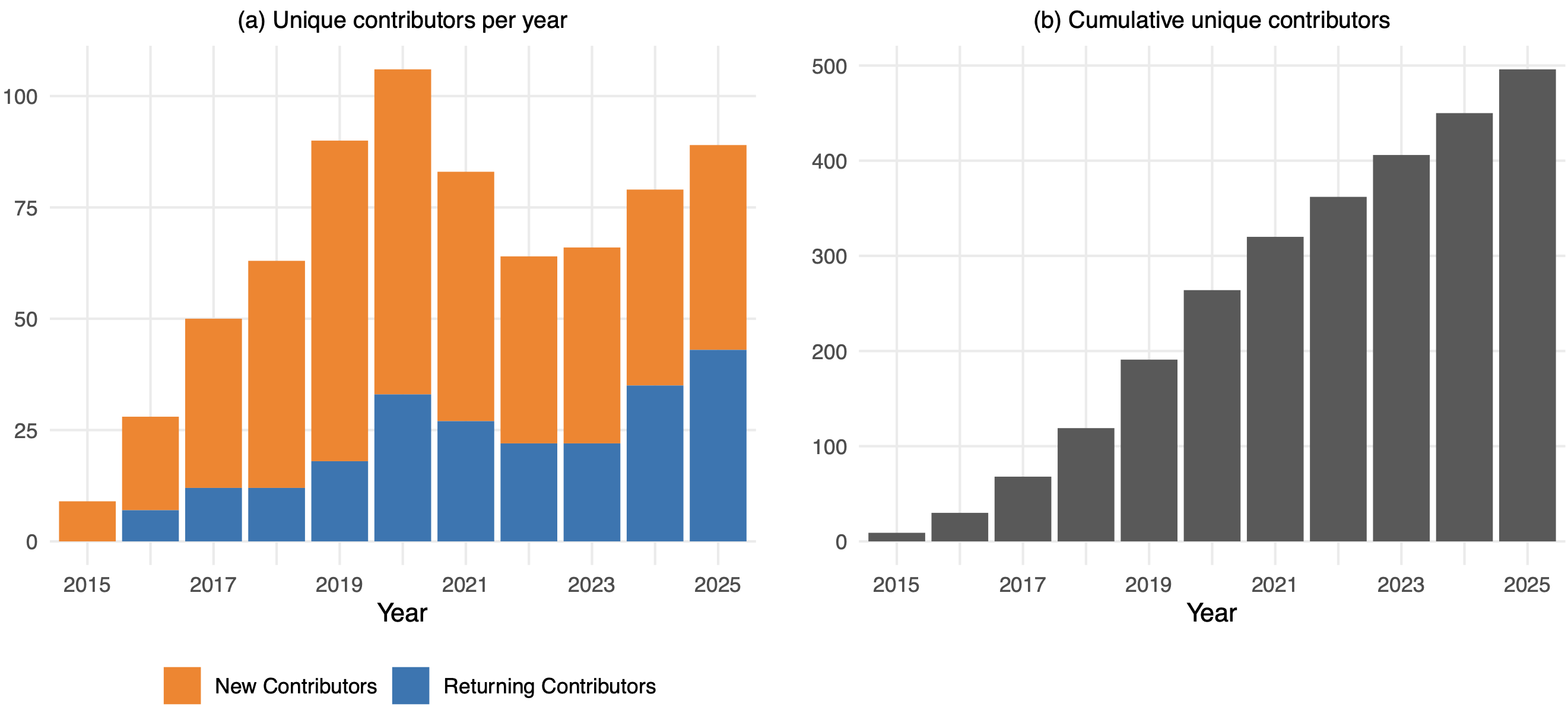
GitHub contributors per year (new and returning). Community growth reflects ongoing adoption and active maintenance since 2014.
What’s new in version 4?
Three core goals of the version 4 rewrite:
- Spatial data classes — native support for
sf,stars, andterra; extensible to any class - Map layer functions — generic and extendable; consistent syntax for all map variables
- Visualization platforms — support for additional rendering modes beyond
"plot"and"view"
Extensions (as of 2026)
| Package | What it adds |
|---|---|
tmap.cartogram |
tm_cartogram() — distorted polygon maps |
tmap.glyphs |
tm_donuts(), tm_flower() — glyph maps |
tmap.networks |
tm_edges(), tm_nodes() — network maps |
tmap.mapgl |
"mapbox" and "maplibre" rendering modes |
tmap.sources |
access remote sources (PMTiles) |
All five are on CRAN. Three are in early development; tmap.cartogram is the most mature.
tmap downloads in context (Figure 2)
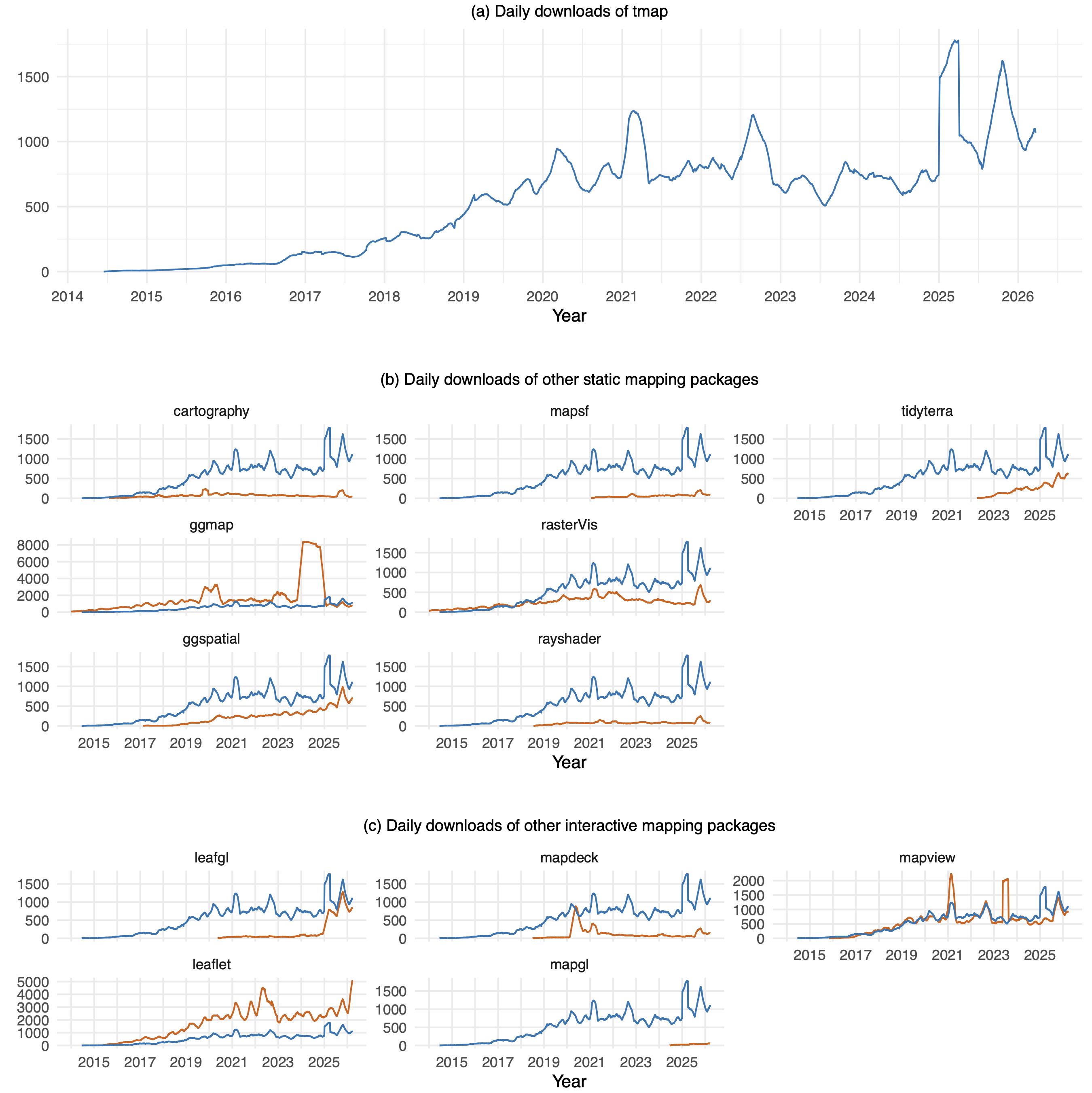
Daily downloads, smoothed 91-day rolling average. Orange = other packages; blue = tmap for comparison. tmap and mapview have remained similarly popular since ~2016.
Grammar of thematic maps
Layered Grammar of Thematic Maps — LGoTM (Figure 3)
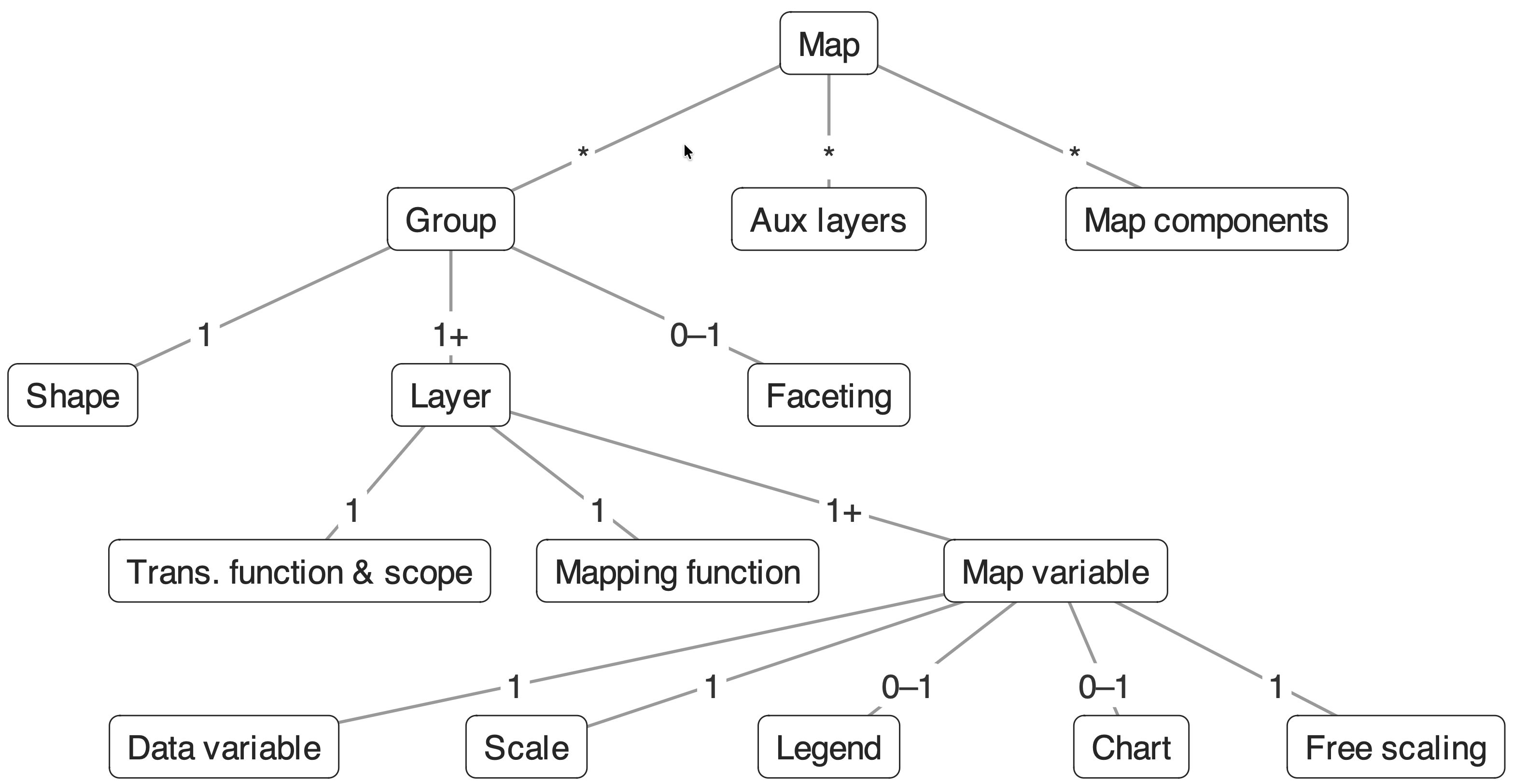
Hierarchical structure of the LGoTM. A Map contains Groups, Aux layers, and Map components. Each Group has a Shape and one or more Layers.
LGoTM in words
- A map is composed of groups, each with a shape and one or more layers
- Each layer has a transformation function that transforms features before mapping
- Geometric: e.g.
tm_dots()applied to polygons → centroids - Data-driven: e.g. cartograms distort polygon geometry proportional to a variable
- Geometric: e.g.
- Each layer has a mapping function that maps data to visual properties
- Map variables (fill, col, size, lwd…) can be constant or data-driven
- Each data-driven variable has a scale and optional legend
- Auxiliary layers (basemaps, graticules) and map components (scalebar, compass) complete the map
Building blocks in code
LGoTM in practice — NLD choropleth (Figure 4)
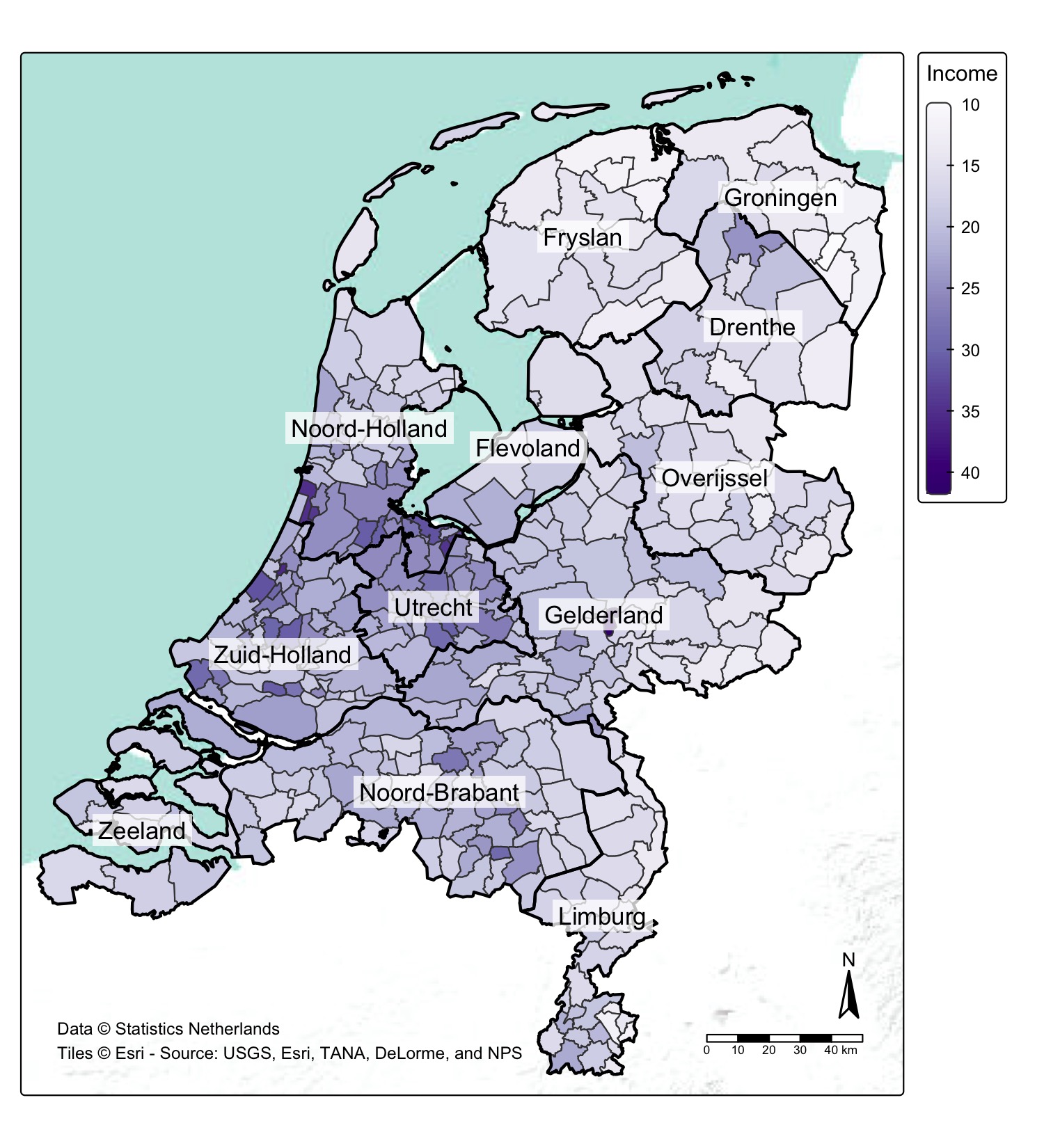
The map above is generated by the code on the previous slide. See tmap4_manuscript_figures.R. It contains two Groups, one auxiliary layer (basemap), and two map components (compass, scalebar).
Naming conventions
tm_prefix → stackable layer and component functionstmap_prefix → standalone utility functions (tmap_mode(),tmap_save()…)- Map variable arguments follow a consistent dot notation:
fill,fill.scale,fill.legend,fill.chart,fill.free- Same pattern for
col,size,lwd,lty,shape…
Map variables per layer
| Layer | Map variables |
|---|---|
tm_polygons |
fill, fill_alpha, col, col_alpha, lwd, lty |
tm_symbols |
size, shape, fill, fill_alpha, col, col_alpha, lwd |
tm_lines |
col, col_alpha, lwd, lty |
tm_raster |
col, col_alpha |
tm_text |
text, size, col, col_alpha, fontface |
Each can be constant or data-driven. If data-driven, add .scale and optionally .legend.
Scale functions
| Function | Primary use |
|---|---|
tm_scale_continuous() |
colour gradients, symbol size, line width |
tm_scale_intervals() |
classified choropleth (n, style, breaks) |
tm_scale_categorical() |
categorical colour or symbol shape |
tm_scale_rgb() |
RGB raster images |
tm_scale_asis() |
pre-encoded values (e.g. colour column) |
Getting started
Step 1: Installation
Current CRAN version: 4.3
Step 2: Find demo datasets
Included in tmap:
Vector: World, NLD_prov, NLD_muni, NLD_dist, metro, World_rivers
Raster: land
Other datasets in spData. Large datasets (Zion NP rasters, etc.) in spDataLarge.
Step 3: Your first map
Switch to interactive with one call:
Step 4: Learn more
- Online vignettes — full reference with examples
- Geocomputation with R — practical mapping chapter
- Spatial Data Visualization with tmap — upcoming book A Practical Guide to Thematic Mapping in R
Recap
- tmap is a powerful and flexible R package for spatial data visualization
- Version 4 (2025–2026): extensible, generic layer functions, consistent syntax
- The same tmap code runs in both static (
"plot") and interactive ("view") mode - Extensions add new modes, layer types, and spatial object support
- Main documentation